Internet, Email & Telephones > Getting Connected
Getting Connected to the Internet
 Basic
Basic


By Lasa Information Systems Team
< Previous | 1 | 2 | 3
Connection hardware
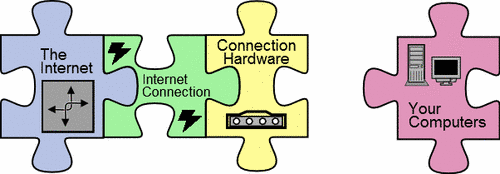
Whatever options you choose for your connection, you also need to decide on the best hardware to make this connection available to your computers.
Different hardware is needed for different kinds of connection – these are all commonly called modems (even though the term modems only strictly applies to some of them). The type of modem you get will be dictated by the type of connection you choose – an ADSL modem for ADSL, ISDN modem for ISDN etc.
Choosing Hardware
There is a great deal of choice here, particularly when it comes to ADSL hardware. Many ADSL modems also include other networking functions, such as routing and wireless networking. It is well worth spending slightly more to get some of these functions – particularly routing. Even if you don’t have a network, an ADSL modem with routing will help protect your computers from viruses and hackers. Buying an ADSL modem with a built in router is also the simplest way to share an internet connection with other computers on your network. If you don’t already have a network, this is a great way to start.
Be aware that some ISPs provide free hardware for connecting to their ADSL products. Often this hardware is the most basic available, and may not have any built in security. BT have been particularly guilty of this – computers connecting using some of their hardware can become infected with viruses within minutes of connecting. If your ISP is providing hardware, make sure to ask if it includes any security features such as NAT (Network Address Translation) or a firewall before you connect to the internet with it!
Note that you do not have to use the hardware supplied by your ISP to connect – any ADSL modem can connect to any ADSL service. You can often save money by buying your connection hardware from somewhere other than your ISP.
Make sure that any connection hardware you buy is compatible with your network. In most cases, this means it uses network cables to connect rather than USB.
Connecting to your network
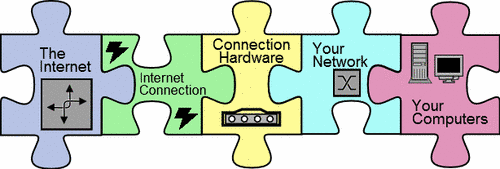
The final piece of the puzzle is your network, if you have one. Your network may already have a server, routers and other hardware which connects your computers together. If you don’t have a network, you will need some basic hardware in order to share your internet connection between computers – see the Knowledgebase article Getting a Network for more on this.
If you chose an ADSL modem with a built in router this may be all you need (with the exception of network cards and cables for each computer you wish to connect).
Your network may also include other hardware such as a firewall or server. Consider in what order this hardware will be connected – you should connect any hardware firewalls directly to your connection hardware, and then connect further hardware to the firewall in order to take advantage of its protection.
You may not have a network, in which case your computer should connect directly to the Connection Hardware (or firewall if you have one).
In cases where you have a very small peer-to-peer network, you may have to connect each computer to the connection hardware directly.
Once you've assembled all the pieces of the puzzle you should have a reliable internet connections that meets both your organisation's needs and budget. If you choose carefully, you shouldn't need to go through the selection process more often than once every five years (although you may wish to switch providers sooner to take advantage of better prices or faster speeds).
About the author
Lasa Information Systems Team
Lasa's Information Systems Team provides a range of services to third sector organisations including ICT Health Checks and consulting on the best application of technology in your organisation.
Lasa IST maintains the knowledgebase.
Follow us on Twitter @LasaICT
Glossary
ADSL, Backup, Broadband, Firewall, Hardware, Hosting, Internet, IP Address, ISDN, ISP, kbps, Leased Line, Line, MAC, Mbps, Modem, NAT, Network, Router, SDSL, Service Level Agreement, Switch, USB, VPN, Web Server, Wireless
Published: 31st July 2006
Copyright © 2006 Lasa Information Systems Team
 This work is licensed under a Creative Commons Attribution-NonCommercial-NoDerivs 2.0 UK: England & Wales License.
< Previous | 1 | 2 | 3